Modelica Language Server
The Modelica Language Server provides editor features for Modelica files, such as hover information and Go to Definition, to any text editor that speaks the Language Server Protocol (LSP). It is developed by the OpenModelica project, but as a separate program with its own repository, releases and issue tracker.
The language server is not tied to one editor. OpenModelica ships it with OMEdit, and the same server is published as an extension for Visual Studio Code. Both are clients of one and the same server.
The Language Server Protocol
Without the Language Server Protocol, every editor has to implement its own support for every language. LSP splits this into two programs:
The language server knows the language. It parses Modelica files, keeps track of the classes and components declared in them and answers questions about them.
The language client is the editor. It shows the text, reacts to the user and asks the server whenever it needs language knowledge - for example when the mouse hovers over a name.
Client and server are separate processes. The client starts the server as a child process and the two exchange JSON-RPC messages over a pipe; nothing goes over the network. There are three kinds of messages:
Requests expect an answer, e.g.
textDocument/hoverortextDocument/definition.Responses answer a request.
Notifications are one-way, e.g.
textDocument/didChangesent by the client whenever the text in the editor changes.
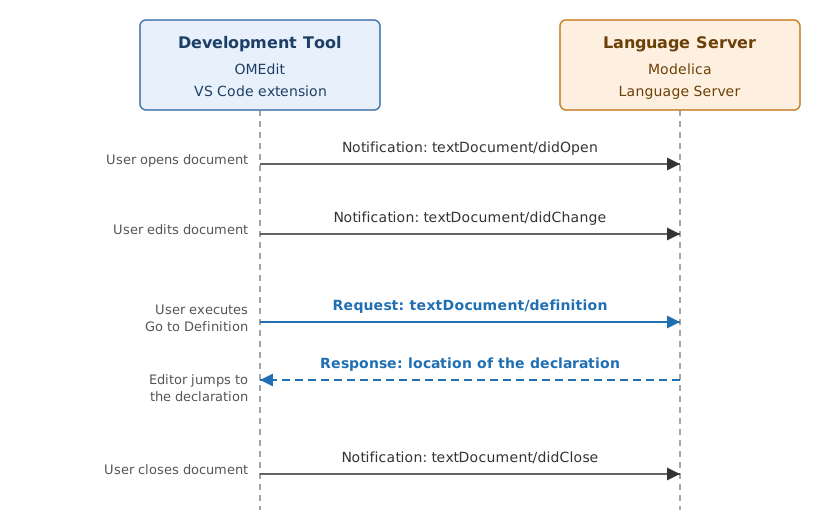
Figure 33 Messages exchanged between a development tool and the Modelica Language Server while a document is edited and Go to Definition is used.
Features
The server parses Modelica with tree-sitter-modelica. It does not use the OpenModelica Compiler, so it is fast and works on incomplete or erroneous code, but it does not instantiate or check models the way the compiler does.
The language server provides:
Hover - documentation and declaration of the symbol under the mouse.
Go to declaration and definition - navigate to where a class or component is declared, also across files and into loaded libraries.
Document outline - the classes and components of a file.
Newer releases add more features, some of which are off by default and have to be enabled by the client: Modelica syntax diagnostics, code completion, document formatting, semantic highlighting and highlighting of all references to a symbol. Which client uses which feature depends on the client; see the README and the release notes for the current feature list and the settings that control them.
Clients
OMEdit
OMEdit has a built-in language client and OpenModelica installs the language server with it, so it works without any setup. OMEdit uses the server for hover tooltips and Go to Definition in its text editor and passes the libraries loaded in OMEdit to the server.
How to enable or disable the language server, choose a different server version and diagnose problems is described in Language Server Options.
Visual Studio Code
The Modelica Language Server extension brings the server to Visual Studio Code. Install it from the Visual Studio Marketplace or, for VS Code compatible editors such as VSCodium, from the Open VSX Registry. The extension contains its own copy of the server, so OpenModelica does not need to be installed.
Libraries outside the opened folder, such as the Modelica Standard Library, are
made known to the server with the modelica.libraries setting, a list of
library root directories, or with the Modelica: Load Library command:
{
  "modelica.libraries": [
    "/home/user/.openmodelica/libraries/Modelica 4.0.0+maint.om"
  ]
}
The libraries installed by the OpenModelica package manager are in
~/.openmodelica/libraries/ on Linux and macOS and in
%APPDATA%\OpenModelica\libraries\ on Windows.
For syntax highlighting, install the MetaModelica extension in addition.
Other Editors
Any editor with an LSP client, e.g. Neovim, Emacs or Helix, can use the
server. Each release
provides a standalone executable for Linux, macOS and Windows that brings its
own runtime. Download it together with tree-sitter-modelica.wasm and
web-tree-sitter.wasm and keep all three files in the same directory -
without the two .wasm files the server starts but answers nothing. Then
configure the editor to start modelica-language-server --stdio for files
with the extension .mo and pass the library directories in
initializationOptions as described above, e.g.
{
  "modelicaPath": [
    "/home/user/.openmodelica/libraries/Modelica 4.0.0+maint.om"
  ]
}
Reporting Issues
Problems with the language server itself - wrong hover text, missing or wrong definitions, crashes of the server process - belong in the modelica-language-server issue tracker. Problems with how OMEdit starts or uses the server belong in the OpenModelica issue tracker.

