UML Class and Instance Diagrams
OpenModelica draws two kinds of UML diagrams of Modelica code:
A class diagram shows the classes as they are written: a class, the classes it extends and the classes it uses, each once, with the modifiers declared in it. It is made from the code alone, without instantiating it, so it works for packages, partial classes and functions too.
An instance diagram shows a model as it is instantiated: the model and its components, each instance as a box of its own, with the values its parameters have in that instance, and the connections between them.
Both are made by the compiler with the scripting functions getClassDiagram and getInstanceDiagram, so they can be used from scripts, OMShell, OMNotebook and the other clients. OMEdit shows the class diagram of a class in its Class Diagram window.
Formats
Both functions return the diagram as text, or write it to the file given as
fileName and return the file name. format is one of:
"plantuml"(the default): PlantUML text, to be rendered with PlantUML."mermaid": Mermaid text. GitHub and GitLab show amermaidcode block in Markdown as a diagram, which is handy for issues, pull requests and the README of a library."drawio": a draw.io (diagrams.net) file, which can be opened, rearranged and edited in draw.io. In it every class and every line in the box of a class links to the code, e.g.modelica://Tanks.Tank?lineNumber=8&element=k; OMEdit follows these links.
The examples below use this package:
package Tanks
  partial model Vessel
    parameter Real area = 1 "Base area";
    Real level(start = 0);
  end Vessel;
  model Tank
    extends Vessel(area = 2);
    parameter Real k = 0.5 "Outflow coefficient";
    Real qIn, qOut;
  equation
    area*der(level) = qIn - qOut;
    qOut = k*sqrt(max(level, 0));
  end Tank;
  model TwoTanks
    parameter Real k = 0.4;
    Tank t1(k = k), t2(area = 3);
  equation
    t1.qIn = 1;
    t2.qIn = t1.qOut;
  end TwoTanks;
end Tanks;
Class Diagrams
>>> getClassDiagram(Tanks.TwoTanks, fileName = "TwoTanks-class.mmd", format = "mermaid")
"TwoTanks-class.mmd"
classDiagram
  class Tanks_TwoTanks["Tanks.TwoTanks"] {
    <<model>>
    + parameter Real k = 0.4
    + Tank t1#40;k = k#41;
    + Tank t2#40;area = 3#41;
  }
  class Tanks_Tank["Tanks.Tank"] {
    <<model>>
    + parameter Real k = 0.5
    + Real qIn
    + Real qOut
  }
  class Tanks_Vessel["Tanks.Vessel"] {
    <<partial model>>
    + parameter Real area = 1
    + Real level#40;start = 0#41;
  }
  Tanks_TwoTanks *-- Tanks_Tank : t1
  Tanks_TwoTanks *-- Tanks_Tank : t2
  Tanks_Vessel <|-- Tanks_Tank : #40;area = 2#41;
Mermaid reads a member with parentheses as a method, so the parentheses of
modifiers are written as the codes #40; and #41;, which Mermaid shows as
( and ).
TwoTanks is composed of two Tank components, labelled with their names,
and Tank is a generalization of the partial Vessel, labelled with the
modifiers of its extends. Each class is shown once, with the components and
modifiers declared in it, so area = 2 and area = 3 appear where they are
written, not as the values of the instances.
The options of getClassDiagram:
depth(default 1): how many levels of used classes to include, i.e. the types of the components and the classes replaceable classes default to, are constrained by or are redeclared as. Withdepth = 0the diagram has only the class and its base classes, which are always included.exclude(default{"Modelica.Icons"}): classes and packages to leave out.showModifiers(defaulttrue):falseleaves out the modifiers and bindings.
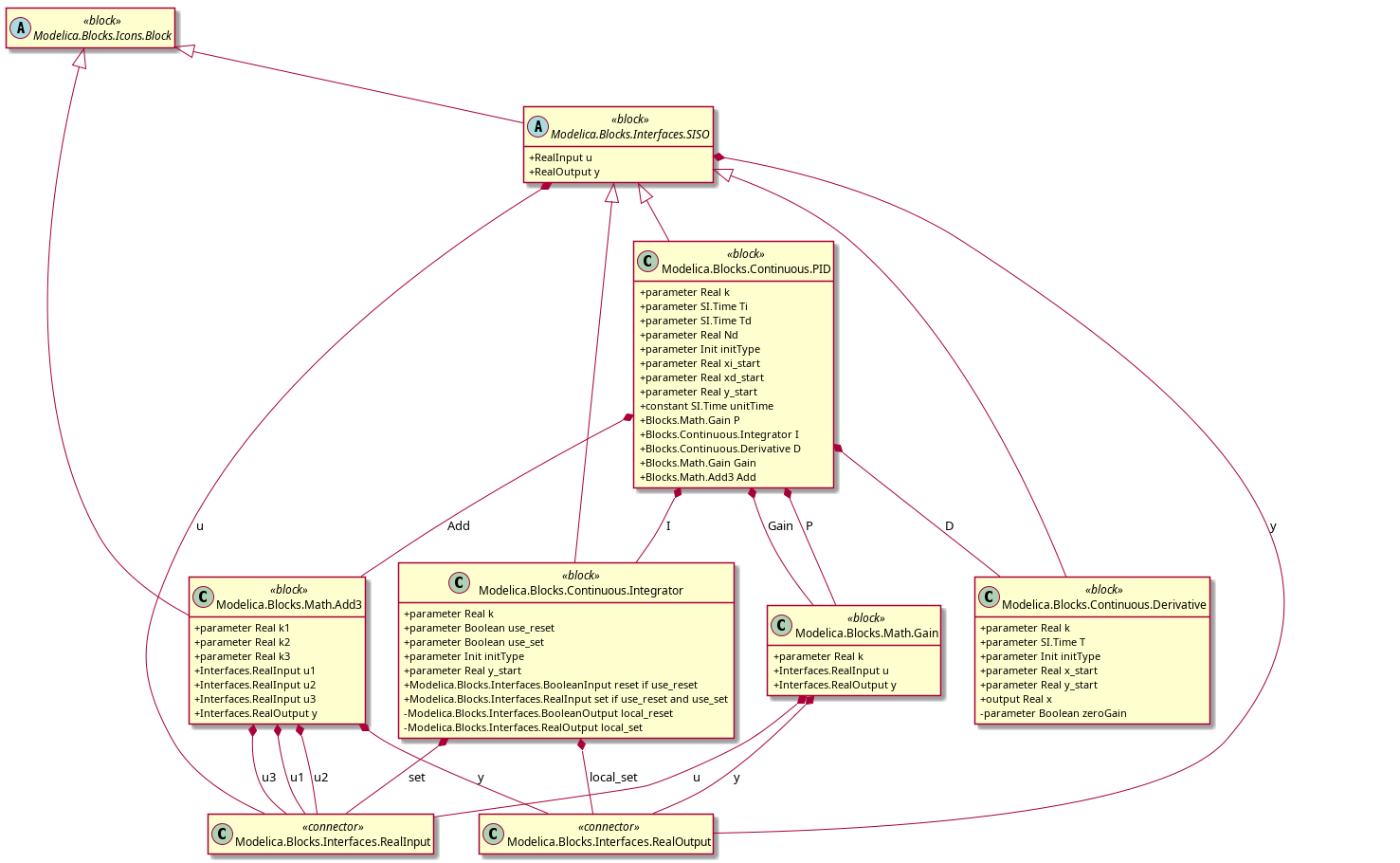
Figure 34 getClassDiagram(Modelica.Blocks.Continuous.PID, showModifiers = false)
rendered with PlantUML.
Replaceable classes, redeclarations and class extends (redeclare model
extends) are shown as well: the stereotype of a class tells how it is
declared, e.g. «replaceable package», a class extends is a generalization of
the class it replaces, and constraining classes and redeclarations are
dependencies. In this package, modelled after Modelica.Media, Pipe has a
replaceable medium, System redeclares it as Water, and Water
redefines the function h of the partial medium with a class extends:
package R
  partial package PartialMedium
    constant Integer nX = 1;
    replaceable function h
      input Real x;
      output Real y = x;
    end h;
  end PartialMedium;
  package Water
    extends PartialMedium(nX = 2);
    redeclare function extends h
    algorithm
      y := 2*x;
    end h;
  end Water;
  model Pipe
    replaceable package Medium = PartialMedium;
    Real z[Medium.nX] = fill(Medium.h(1), Medium.nX);
  end Pipe;
  model System
    Pipe p(redeclare package Medium = Water);
  end System;
end R;
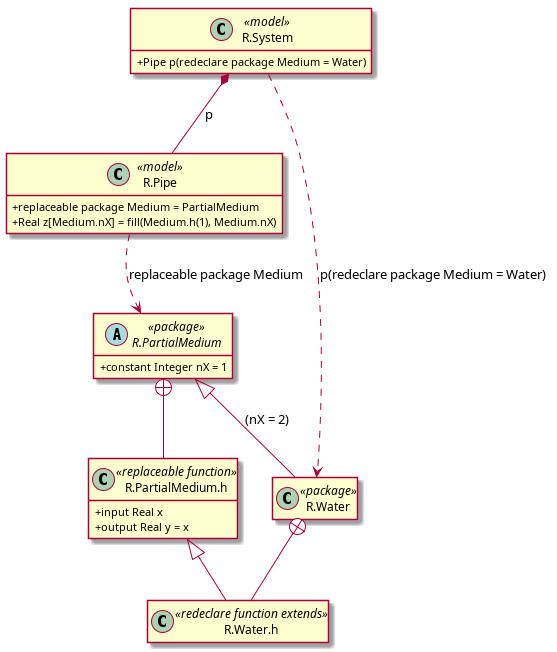
Figure 35 getClassDiagram(R.System) rendered with PlantUML: the dashed arrows are
the replaceable package and its redeclaration, R.Water.h extends the
function it redeclares, and the nested classes are attached to the package
they are declared in.
This makes the diagram useful to understand the structure of a library such as Modelica.Media:
getClassDiagram(Modelica.Media.Water.StandardWater, fileName = "Water.drawio",
                format = "drawio", depth = 2)
Instance Diagrams
>>> getInstanceDiagram(Tanks.TwoTanks, fileName = "TwoTanks-instance.mmd", format = "mermaid")
"TwoTanks-instance.mmd"
classDiagram
  class I_Tanks_TwoTanks["Tanks.TwoTanks"] {
    <<model>>
    + parameter Real k = 0.4
  }
  class I_t1["t1 : Tanks.Tank"] {
    <<model>>
    + parameter Real area = 2
    + parameter Real k = k #40;= 0.4#41;
  }
  class I_t2["t2 : Tanks.Tank"] {
    <<model>>
    + parameter Real area = 3
    + parameter Real k = 0.5
  }
  I_Tanks_TwoTanks *-- I_t1 : t1
  I_Tanks_TwoTanks *-- I_t2 : t2
Each component that is an instance of a class is a box named after its path and
class, e.g. t1 : Tanks.Tank. The box has the parameters and constants of the
instance, including the inherited ones, with their binding as written and, when
it is not a literal, the value it evaluates to in this instance, e.g.
k = k (= 0.4). Variables are not shown.
The options of getInstanceDiagram:
depth(default 1): how many levels of components are drawn as boxes of their own. Components below that, and connectors, are lines in the box of the instance they are in.exclude: classes and packages whose instances are left out.showConnections(defaulttrue): the connect equations are drawn as associations between the boxes of the components they connect, labelled with the connectors.showProtected(defaultfalse): also show the protected elements, marked with-.expandArrays(defaultfalse): an array of components is one box, e.g.r[10] : Resistor; withtrueeach element gets a box of its own with its own values, for arrays of known size with at most 100 elements.
For a model built from library components, depth = 1 shows the components
of the model, and a higher depth the components inside them:
loadModel(Modelica, {"4.1.0"});
getInstanceDiagram(Modelica.Electrical.Analog.Examples.ChuaCircuit,
                   fileName = "ChuaCircuit.puml")
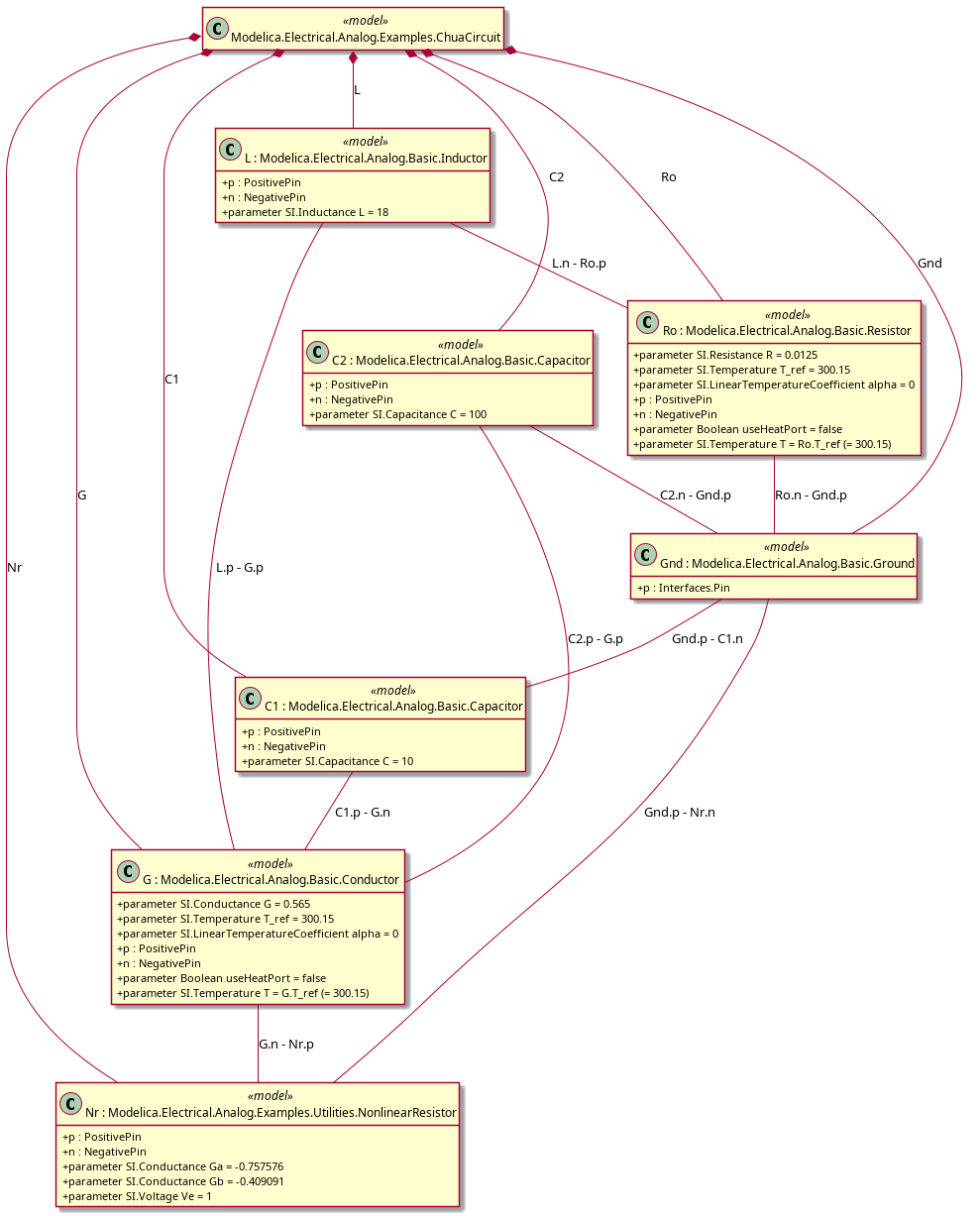
Figure 36 The instance diagram of Modelica.Electrical.Analog.Examples.ChuaCircuit rendered with PlantUML: the values of the parameters in each component, and the connections labelled with the connectors.

