Property Probes and CodeProber
CodeProber, from Lund University, is a property probing tool: it shows the source code of a program in a browser editor, and a right-click on any part of it creates a probe, a small window with a property of that part, as the compiler computes it. Probes stay open and are updated whenever the code is edited, so they show live how a change affects what the compiler does with the code.
OpenModelica provides what such a tool needs through two scripting functions:
getProbeTree returns the probe tree of a file: its classes, elements, equations, statements and names, with their positions in the file and the properties that can be asked for each of them.
evaluateProbe evaluates one property of one node of that tree.
All the knowledge is in omc. A client, like the CodeProber one, only maps the tree and the results to its user interface, so a new property only has to be added to the compiler.
The Probe Tree
The tree follows the structure of the parsed file. Its nodes have a kind:
StoredDefinition (the file), ClassDefinition, ComponentDeclaration,
ComponentClause (several components declared together),
ExtendsClause, ImportClause, Equation and Statement, and the
names in them, declared or used, are Ident leaves. Every node has an
id, the indices of the children on the way from the root, e.g.
0.0.2.3 for the fourth element of the third class of the first class of the
file, its span in the file, and the names of its properties. For a file
that does not parse, root is null and errors has the syntax errors.
The file has to be loaded first. The examples below use a small circuit, ProbeCircuit.mo:
 1package EQ
 2  connector Pin
 3    Real v;
 4    flow Real i;
 5  end Pin;
 6  model R
 7    parameter Real r = 2;
 8    Pin p, n;
 9  equation
10    p.v - n.v = r*p.i;
11    p.i + n.i = 0;
12  end R;
13  model V
14    Pin p, n;
15  equation
16    p.v - n.v = sin(time);
17    p.i + n.i = 0;
18  end V;
19  model G
20    Pin p;
21  equation
22    p.v = 0;
23  end G;
24  model B
25    V src;
26    R r1(r = 3), r2;
27    G gnd;
28  equation
29    connect(src.p, r1.p);
30    connect(r1.n, r2.p);
31    connect(r2.n, src.n);
32    connect(src.n, gnd.p);
33  end B;
34end EQ;
getProbeTree("ProbeCircuit.mo", prettyPrint = true) returns the tree as JSON.
This is the node of the equation p.v - n.v = r*p.i of R, with only the
first of its seven children, the Ident of the first p:
{
  "id": "0.0.2.3",
  "kind": "Equation",
  "label": "=",
  "lineStart": 10,
  "columnStart": 5,
  "lineEnd": 10,
  "columnEnd": 22,
  "properties": ["simEquations", "jacobianEquations", "bltBlock", "cCode", "text", "hover"],
  "children": [
    {
      "id": "0.0.2.3.0",
      "kind": "Ident",
      "label": "p",
      "lineStart": 10,
      "columnStart": 5,
      "lineEnd": 10,
      "columnEnd": 5,
      "properties": ["definition", "role", "text", "hover"],
      "children": []
    }
  ]
}
Properties
evaluateProbe(fileName, nodeId, property, contextModel) returns the
property as a JSON list of items. An item is a text, a node (a link to
another node of the tree), a diagnostic (severity, span and message)
or an arrow between two spans.
>>> evaluateProbe("ProbeCircuit.mo", "0.0.5.4", "connectionEquations")
{"node":"0.0.5.4", "property":"connectionEquations", "result":[{"text":"'src.p.v' = 'r1.p.v';"}, {"text":"'r1.p.i' + 'src.p.i' = 0.0;"}]}
The properties are:
On every node:
textandhover.On the file:
errors(names that cannot be found and the messages of checkModel of its models, at their positions),topClasses,contextModelandomcVersion.On names:
definition(the node that declares the name),uses,useArrowsandrole.On classes:
dependsOn,checkModel,flatModelica(the class as Base Modelica) andmodelInstance(the JSON of getModelInstance).From the translation of a model:
simVariables,simEquations,jacobianEquations,cCode(the generated C function of each simulation equation),translationMessages,flatDeclarationsandconnectionEquations. The simulation equations are shown with the symbolic operations that made them, e.g. how an equation was solved.bltof a class: the blocks of the initial and the regular equations in the order they are solved, assignments and systems of equations with their iteration variables and torn and residual equations, each linked to the equation of the file it comes from.bltBlockof an equation or a statement: the blocks its simulation equations are in, which shows the other equations of the same algebraic loop.stateSelectionof a class or component: the states, the dummy states chosen by index reduction, with the variable they equal and the steps that made them so, and thestateSelectattributes.
The translation properties need a model to translate. It is contextModel
if given, otherwise the model the node is in. An equation of R is
translated as part of the whole circuit with contextModel = "EQ.B":
>>> evaluateProbe("ProbeCircuit.mo", "0.0.2.3", "hover", "EQ.B")
{"node":"0.0.2.3", "property":"hover", "result":[{"text":"eq 4 [initial, torn] r2.p.i := (src.p.v - r1.n.v) / r1.r"}, {"text":"eq 5 [initial, residual] r2.r * r2.p.i - r1.n.v"}, {"text":"eq 10 [regular, torn] r1.n.v := src.p.v - r1.r * r2.p.i"}, {"text":"eq 11 [regular, residual] r2.r * r2.p.i - r1.n.v"}]}
The translation is kept in the temporary directory, under a hash of the name and the contents of the file, so a model is translated once for each version of the file, and probes on an unchanged file are answered right away.
Using CodeProber
CodeProber runs as a local web server, given a jar file that connects it to a compiler. A prototype that connects it to omc can be downloaded from https://build.openmodelica.org/omc/codeprober/, with instructions. It needs Java 11 or newer and an OpenModelica nightly build.
In the browser, a right-click on a name or an equation, Create Probe, and the
choice of a property opens a probe. Diagnostics like the errors of the file
are shown as squiggles in the editor and arrows like useArrows as arrows
between the lines.
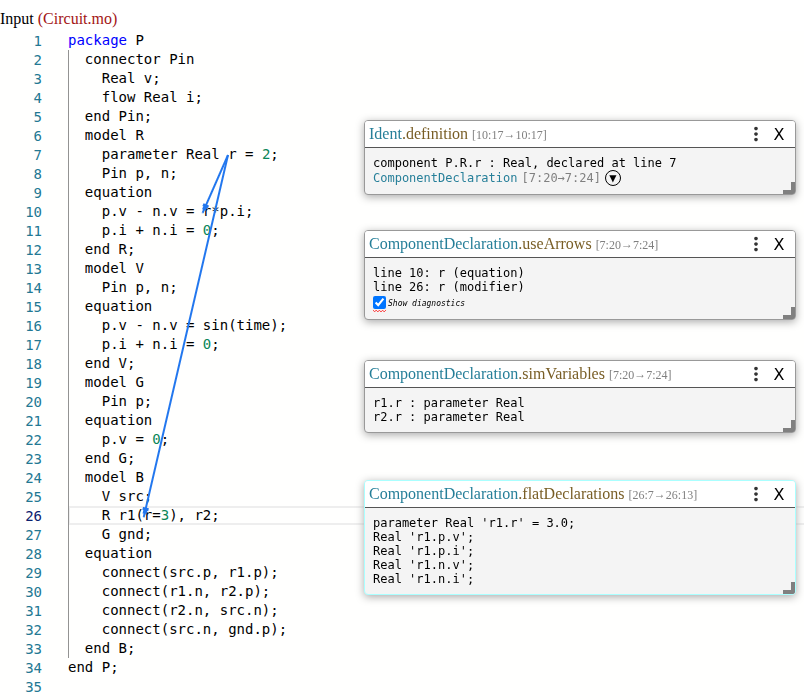
Figure 37 Probes on the parameter r: its definition, its uses drawn as arrows, the
simulation variables it becomes in the translated model, and the flat
declarations of the component r1 that modifies it.
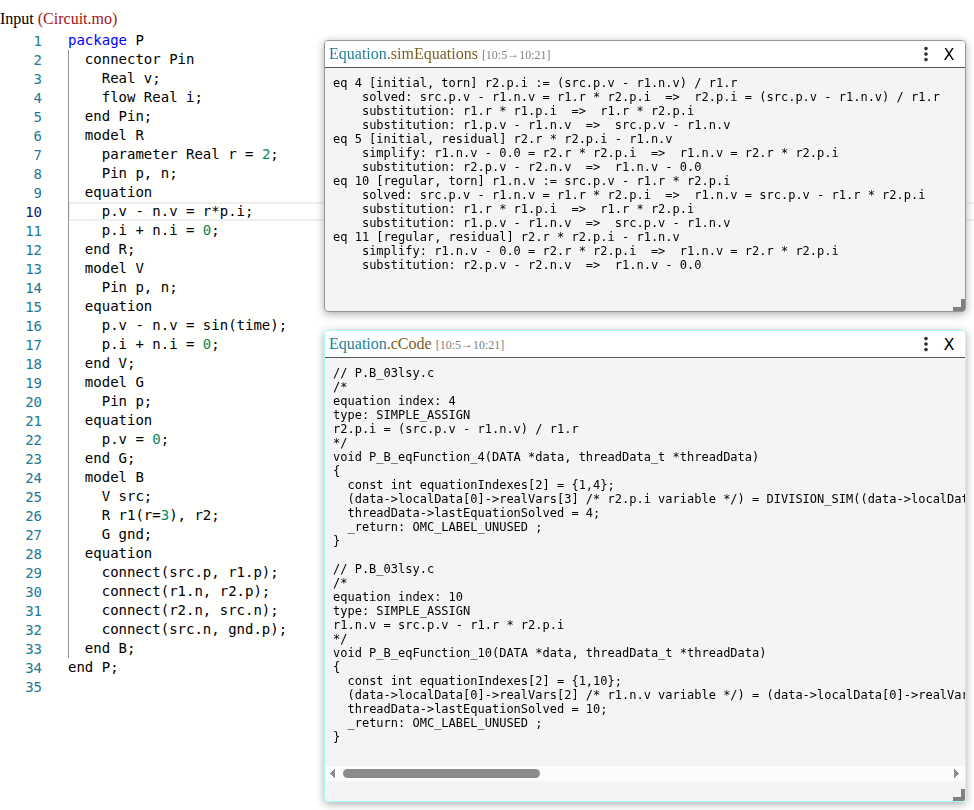
Figure 38 The simulation equations of an equation of R, with the symbolic
operations that made them, and the C functions generated for them.
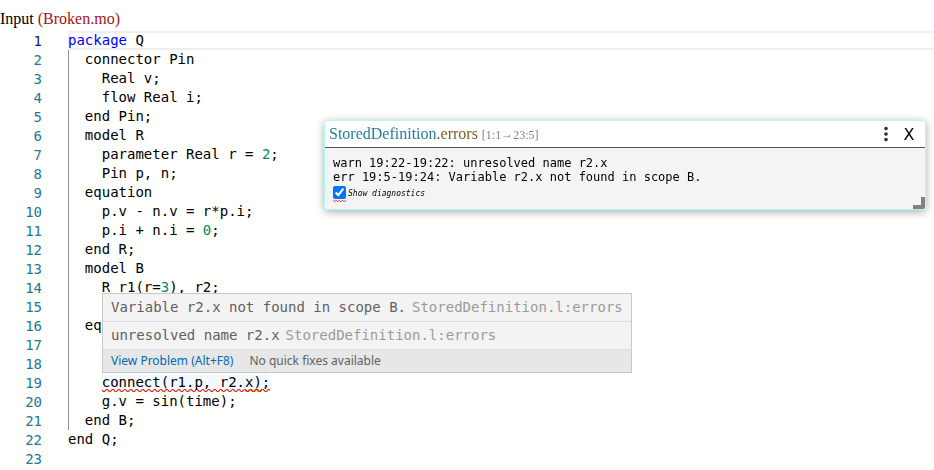
Figure 39 The errors of a file: a connector that does not exist, as a probe and as a squiggle in the editor.
CodeProber also has text probes: a comment like
connect(src.p, r1.p); // [[Equation.connectionEquations~="'src.p.v' = 'r1.p.v';"]]
asserts that a property of the node on that line contains the given text.
CodeProber checks these assertions in the editor, and codeprober.jar --test
checks them from the command line, which turns them into regression tests of
what the compiler does with a model.

